

Overview
Query Assistant is a feature that generates Honeycomb queries based on your natural language query (NLQ) input. Use Query Assistant to:- learn how to query in Honeycomb faster
- start with a query and then further refine to explore your data
- onboard new team members to Honeycomb
- explore an unfamiliar dataset
Using Query Assistant
You can access Query Assistant underneath the Query Builder. To use Query Assistant, enter your prompt in the search box and select Get Query, or select one of the suggested questions below the search box. Based on your entry or selection, Query Assistant creates and runs a query in the Query Builder. Results appear after the screen refreshes.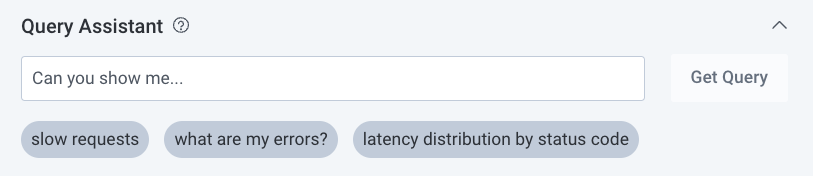
Viewing Query Assistant
You can expand and collapse the Query Assistant display. Any changes you make will persist. You can also control your team’s ability to use Query Assistant in Team Settings. To learn how to enable or disable Query Assistant, visit Teams: Manage Behavior.Best Practices
Query Assistant uses machine learning systems, such as a Large Language Model (LLM) with a generative pre-trained transformer, to assist in creating Honeycomb Queries using natural language. In addition to your schema, Query Assistant uses the following as context:- The current query, if it exists
- Suggested Queries for your dataset
- Dataset Definitions
true.
When a dataset has Suggested Queries configured, Query Assistant analyzes its fields and generates better results.
We recommend configuring your own Suggested Queries for datasets that do not conform to common standards defined by OpenTelemetry instrumentation.
Query Assistant uses the fields defined in Dataset Definitions.
For example, OpenTelemetry (and Honeycomb, by default) recognizes any error as a boolean value in the error field.
When a Dataset Definition overrides this default with a string value in the app.error field, Query Assistant uses the app.error field instead of the error field when it evaluates prompts.
Limitations
A user can use up to 50 natural language queries per 24 hours. Query Assistant is not available to any Honeycomb customer who has signed a HIPAA Business Associate Agreement (BAA).Data Use
Honeycomb uses OpenAI’s API for Query Assistant. Honeycomb sends information to OpenAI’s API for the purpose of generating a runnable query based on your input. Data is only sent when you execute a natural language query. In addition, Honeycomb does not use any data to train ML models. In the future, we are interested in using data to create more personalized user experiences, but we have no plans to incorporate data itself, and all data is still subject to our Data Retention window. What Honeycomb sends to OpenAI:- Your natural language input
- The names of fields in your dataset schema
- Identifying information
- The values of data sent to Honeycomb