

Introduction
Query Math adds support for multi-step queries in Honeycomb. You can now define multiple query steps, perform math between them, and visualize the final result—all inline in the Query Builder. This feature helps you express richer queries without creating temporary calculated fields. Instead of building complex calculated field expressions, you can break down your analysis into logical steps and combine them using simple mathematical formulas. Use Query Math to:- Calculate ratios and percentages directly in your query
- Combine multiple aggregates (for example, error counts and request totals)
- Perform time-series math with functions like
RATE()andINCREASE() - Simplify complex calculated fields into inline formulas
- Compare conditional aggregations side by side
How it works
Query Math lets you create multiple query steps, such as Step A and Step B—each with its own SELECT, WHERE, and GROUP BY clauses. You can then define a formula that references these steps using variables like$A, $B, and so on.
When you run the query, Honeycomb:
- Executes each step independently.
- Evaluates your formula using the results from each step.
- Visualizes the final result.
Using Query Math
To build a query with Query Math:- Select Query () from the navigation menu.
- Define your first step (Step A):
- Select fields in the SELECT clause.
- Add filters in the WHERE clause.
- Optionally, add groupings in the GROUP BY clause.
- Select Add Query to create additional steps (for example, Step B).
- Select Add Formula to define the mathematical relationship between your query steps.
- In the formula editor, reference your steps using
$A,$B, and so on, and combine them using mathematical operators. - Select Run Query to see the result.
All query steps must use the same GROUP BY dimensions.
For example, if Step A groups by
k8s.pod.name, then Step B must also group by k8s.pod.name.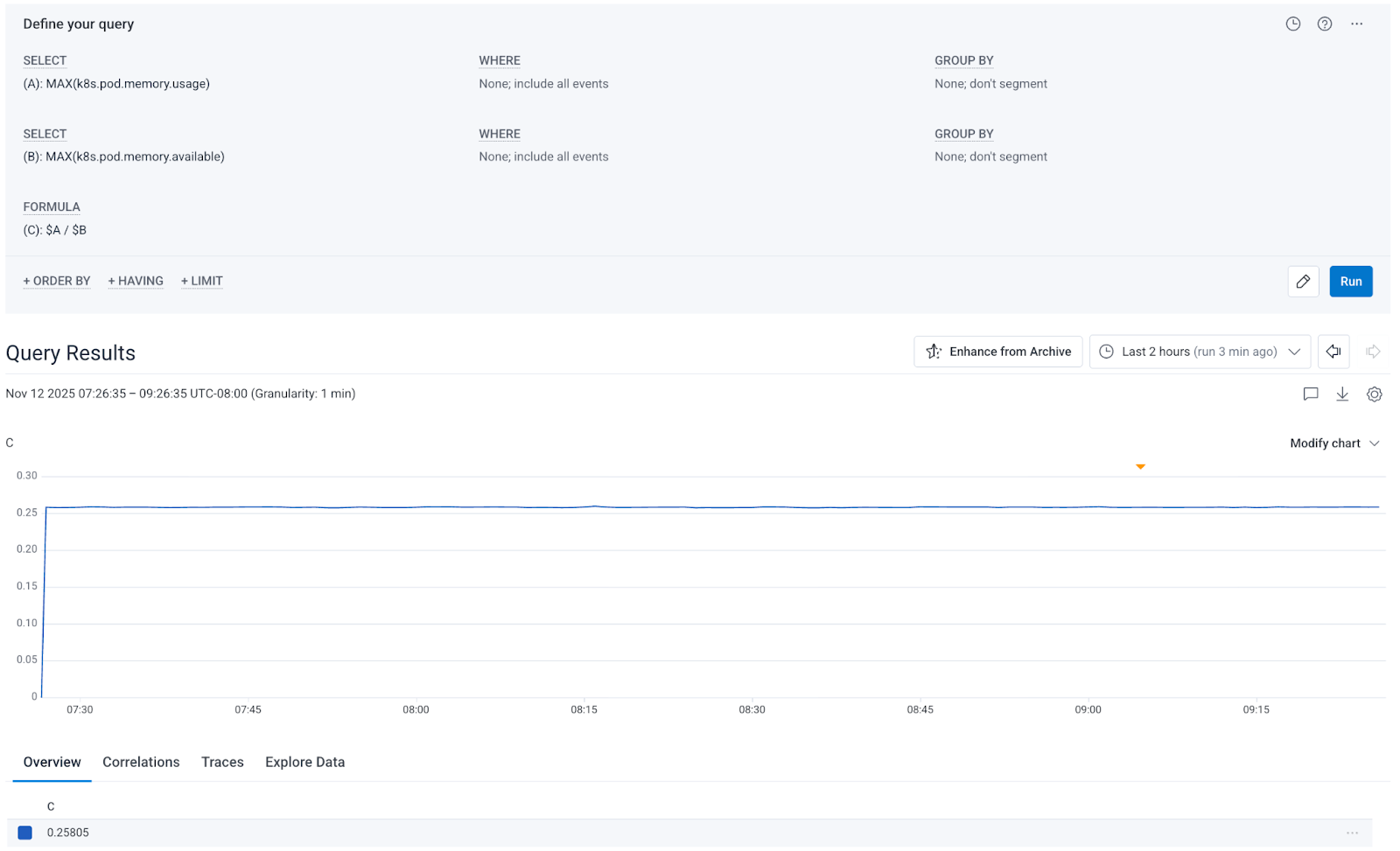
Supported operators in query formulas
Query formulas support standard mathematical operators in infix notation:
You can combine these operators to create complex formulas:
Query math examples
These examples demonstrate common use cases for Query Math. Each shows how to structure your query stages and combine them with formulas.Error rate
Compute the percentage of all requests that resulted in500 errors.
Step A:
SELECT COUNTWHERE status = 500
SELECT COUNT
Success rate
Calculate the percentage of successful requests (non-error status codes). Step A:SELECT COUNTWHERE status < 400
SELECT COUNT
Memory utilization percentage
Calculate the percentage of available memory that is currently in use, which makes it easier to identify which pods are approaching capacity. Step A:SELECT MAX(k8s.pod.memory.usage)
SELECT MAX(k8s.pod.memory.available)
Request rate difference
Compare the request rate between two services, which can help you identify load imbalances. Step A:SELECT AVG(request_rate)(create query-scoped calculated fieldrequest_ratewith definitionRATE($http.server.requests))WHERE service.name = "api"
SELECT AVG(request_rate)WHERE service.name = "frontend"
CPU utilization
Combine different temporal aggregation functions to analyze metric behavior. This query compares the current CPU utilization snapshot against the rate of change, helping you understand CPU usage patterns. Step A:SELECT AVG(last_cpu)(create query-scoped calculated fieldlast_cpuwith definitionLAST($k8s.pod.cpu.utilization))
SELECT AVG(rate_cpu)(create query-scoped calculated fieldrate_cpuwith definitionRATE($k8s.pod.cpu.time))
Working with Groupings
When using GROUP BY in Query Math, all query statements must group by the same dimensions. If your query statements have different GROUP BY clauses, the query will fail. For example, if you want to calculate error rates per route: Step A:SELECT COUNTWHERE status >= 400GROUP BY http.route
SELECT COUNTGROUP BY http.route
http.route, producing a separate result for each route.
Combining with Temporal Aggregation
Query Math works seamlessly with temporal aggregation functions. You can useRATE(), INCREASE(), SUMMARIZE(), and LAST() in your query steps, then perform math across the results.
For example, to calculate your error rate as a percentage of total throughput:
Step A:
SELECT SUM(error_rate)(create query-scoped calculated fielderror_ratewith definitionRATE($http.server.errors))
SELECT SUM(request_rate)(create query-scoped calculated fieldrequest_ratewith definitionRATE($http.server.requests))
Visualizing results
When you add a formula to your query, only the formula result appears in the visualization. This keeps your charts focused on the final calculated value. If you want to see the individual step results:- Remove the formula temporarily.
- Run the query to see each step’s results independently.
- Add the formula back when ready.
Tips for building multi-statement queries
Use these strategies to build effective Query Math queries:- Start simple: Build and test each query statement individually before adding a formula.
- Use descriptive calculated field names: Names like
error_rateormemory_utilmake steps easier to understand. - Validate groupings: Ensure all statements use identical GROUP BY clauses to avoid query errors.
- Test incrementally: Add one formula operation at a time to isolate any issues.
- Use parentheses: Explicitly group operations to control evaluation order, especially in complex formulas.