

To learn more about adding automatic instrumentation to your application, visit Start Building: Honeycomb for Applications.
Acquiring Dependencies
Before you can customize your instrumentation, you must install any required dependencies. These will vary depending on your chosen programming language.- JavaScript
- Python
- Java
- .NET
- Go
- Ruby
- Other
To continue, you must install OpenTelemetry’s API package. Once you have installed the API package, you can use it to add instrumentation for everything you care about in your application.
This Quick Start uses the
npm dependency manager.
For instructions with yarn or if using TypeScript, read our OpenTelemetry Node.js documentation.Adding Contextual Information to Existing Spans
To enhance the understanding of your telemetry data, you can attach contextual information to the spans generated by automatic instrumentation. Contextual information includes attributes, which are arbitrary key-value pairs that you can add to provide additional data about the span, such as a specific database query being executed or an HTTP request being made. In this example, you will enhance your automatic instrumentation by associating a span created automatically when a user queries your service with the user’s ID, which will be saved in an attribute calleduser.id.
Once this attribute is added, you will be able to use it to query your data in Honeycomb.
- JavaScript
- Python
- Java
- .NET
- Go
- Ruby
- Other
Creating Custom Spans
To further enhance the understanding of your telemetry data, you’ll want to generate custom spans. Automatic instrumentation can show the shape of requests to your system, but only you know the truly important parts. To get the full picture, you should manually add spans to areas of interest. In OpenTelemetry, this is called manual instrumentation.Initialize a Tracer
Before you can create a custom span, you must initialize a tracer. In OpenTelemetry, a tracer is used to instrument your code and generate telemetry data. The tracer provides the interface for capturing spans, which represent individual units of work in your code.- JavaScript
- Python
- Java
- .NET
- Go
- Ruby
- Other
Create Your Span
Get the tracer from the OpenTelemetry API and use it to create your custom span.- JavaScript
- Python
- Java
- .NET
- Go
- Ruby
- Other
Analyzing Your Results
Now that you have customized your instrumentation, take a look at your trace. We generated the following examples after adding additional custom spans (a note to indicate where we are in the process, plusperson name and message) to our simple greeting service application written in Node.js.
You can see the code in our GitHub repository.
Here’s our example trace:
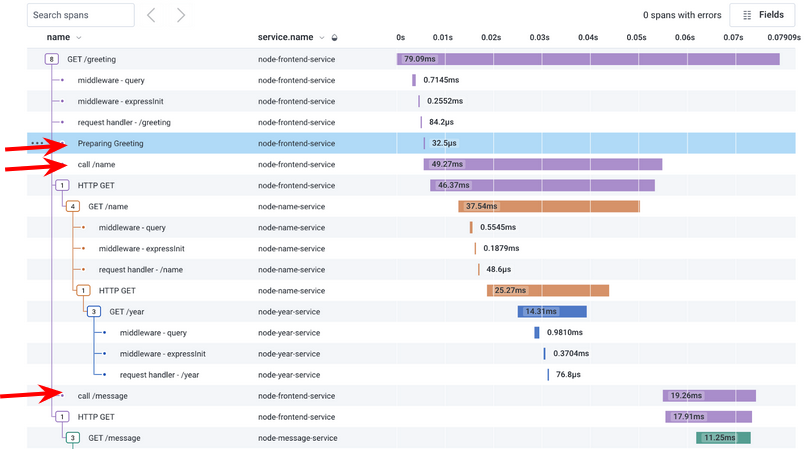
- note indicating we are preparing the greeting
- call name
- call message
What’s Next?
Excellent work! If you made it this far, you should now have additional visibility into the inner workings of your business logic. But there is so much more to explore! To learn more about what you can do with Honeycomb, check out:- Ways to Explore Your Data: Get a quick run-through of the different ways you can explore your data in Honeycomb.
- Board Templates: Get key insights with one-click with out-of-the-box Board Templates.
- Honeycomb’s Sandbox: Explore common scenarios with real data.
- DevRel Office Hours: Join in on observability talk with world-class experts.
- Integrations: Learn about other types of data you can explore with Honeycomb.