> ## Documentation Index
> Fetch the complete documentation index at: https://docs.honeycomb.io/llms.txt
> Use this file to discover all available pages before exploring further.
# Recommended Migrations
> Review Honeycomb's recommended migrations, understand their impact, and access resources to help you migrate.
export const FlexStyleTable = ({columns, overflowWrap = "normal", children}) => {
const colWidths = columns ? columns.trim().split(/\s+/) : [];
const scopeKey = [columns || "auto", overflowWrap].join("-").replace(/[^a-zA-Z0-9-]/g, "-");
const colRules = colWidths.map((width, i) => `[data-fst="${scopeKey}"] table th:nth-of-type(${i + 1}) { width: ${width}; }`).join("\n");
const css = `
[data-fst="${scopeKey}"] table {
table-layout: ${colWidths.length > 0 ? "fixed" : "auto"};
width: 100%;
}
${colRules}
[data-fst="${scopeKey}"] table td { overflow-wrap: ${overflowWrap}; }
`.trim();
return
{children}
;
};
We recommend that customers migrate to the new behaviors listed below.
If you have questions, visit our [Support Knowledge Base](/troubleshoot/customer-support/) or [join our Pollinators Community](/troubleshoot/community/).
## Migrate from metrics-as-events to time series metrics
Honeycomb is migrating Free and Pro customers from the original metrics-as-events implementation to native time series metrics.
Time series metrics store data points in their intended format, which enables more accurate queries, proper support for counters and histograms, and separate billing that does not count against your event allotment.
On June 10, 2026, Honeycomb will begin the rollout:
* If you are not currently sending metrics as events, Honeycomb moves you directly to time series metrics. No action is required.
* If you are on a Free or Pro plan and sending metrics-as-events, your account enters dual ingest mode, during which your metrics will write to both the metrics-as-events dataset and the new time series metrics dataset simultaneously.
After 60 days, you will have the same retention window of data written in both formats, but you can start working with your time series metrics today.
You have approximately six months to complete your migration.
At the close of that window, metrics-as-events will be deprecated for Free and Pro plans.
### Resources
* To understand what is changing and how to update your queries, Boards, and Triggers, visit the [Migrate to Time Series Metrics FAQ](/troubleshoot/product-lifecycle/recommended-migrations/migrate-to-time-series-metrics-faq).
* To learn about time series metrics and how they work in Honeycomb, visit [Metrics in Honeycomb](/get-started/honeycomb/metrics-in-honeycomb).
## Migrate to Refinery 3.0
If you use Refinery, we recommend that you migrate to Refinery 3.0 or later to take advantage of new and improved Refinery features.
Benefits of upgrading your Refinery instance from 2.0 to 3.0 include:
* Efficient CPU and memory utilization
* Enhanced cluster stability and reliability
### Resources
To learn how to migrate to Refinery 3.0 and later, visit [Upgrading Refinery](/troubleshoot/product-lifecycle/recommended-migrations/upgrade-refinery/).
## Migrate to Flexible Boards
Flexible Boards are a new Honeycomb Board format that supports dynamic panel resizing and rearrangement.
To take advantage of these improvements and ensure your Boards continue to work as expected, we recommend migrating all legacy Boards to the Flexible Boards format.
On August 15, 2025, the Honeycomb API will stop supporting legacy Boards.
Any [Board API](/api/boards/) calls that use `"type": "classic"` or omit the `type` field will fail.
By August 29, 2025, Honeycomb will automatically migrate any remaining legacy Boards to the Flexible Boards format.
During this process, query captions will move into the corresponding query's description field.
If you manage Boards using the Honeycomb UI, Honeycomb API or Terraform, update your configurations to use the Flexible Board format.
You can continue managing Boards in your preferred tool after completing the migration.
### Resources
To learn how to convert your legacy Boards to Flexible Boards, visit [Migrate to Flexible Boards](/troubleshoot/product-lifecycle/recommended-migrations/migrate-to-flexible-boards/).
## Migrate from FID to INP in the Honeycomb Web Instrumentation package
The [Honeycomb Web Instrumentation package](/send-data/javascript-browser/) for the Honeycomb OpenTelemetry Web SDK now uses `web-vital` v5.0.0, which removes support for the `fid` (First Input Delay) vital.
To continue capturing meaningful responsiveness metrics, we recommend switching to `inp` (Interaction to Next Paint).
While FID only measures the delay before the browser processes a user's first interaction, INP captures the latency of the slowest qualifying interaction on the page.
It provides a more complete view of user-perceived responsiveness over the full page lifecycle.
### Configuration changes
To migrate, replace `fid` with `inp` in your `WebVitalsInstrumentationConfig`.
The configuration structure remains the same, though `inp` uses a slightly different type: `VitalOptsWithTimings`, which includes additional timing details.
| From | To | Type | Description |
| --------------------------- | --------------------------- | ------------------------------------- | ------------------------------------------------------------------------------------------------------------------------------------------------------------------- |
| `fid` | `inp` | `VitalOpts` to `VitalOptsWithTimings` | Configuration options passed through to `web-vitals`. Visit Google Chrome's [ReportOpts](https://github.com/GoogleChrome/web-vitals?tab=readme-ov-file#reportopts). |
| `fid.applyCustomAttributes` | `inp.applyCustomAttributes` | `function` to `function` | Function that adds custom attributes to core web vitals spans. |
### Deprecated FID attributes
If you’re still using FID, these are the span attributes it produces.
Each has a direct INP equivalent with a similar structure.
| Attribute | Description | Example |
| --------------------- | ----------------------------------------------------------------------------------------------------------------------------------------------------------- | ---------------------------------------------------------------------------------- |
| `fid.id` | Unique identifier for the metric. | `v4-1724856546003-8941918093361` |
| `fid.delta` | Change in value since the last report. | `100` |
| `fid.value` | Time in milliseconds between a user's first interaction with the page and when the browser is able to begin processing event handlers for that interaction. | `100` |
| `fid.rating` | Performance rating based on thresholds. | `good`, `needs-improvement`, `poor` |
| `fid.navigation_type` | Type of navigation that triggered the page load. | `restore`, `navigate`, `reload`, `back-forward`, `prerender`, `back-forward-cache` |
| `fid.element` | CSS selector of the element the user interacted with. The element will be the `target` of the dispatched `event`. | `button#submit` |
| `fid.event_type` | Type of interaction event. | `click` |
| `fid.load_state` | Page load state at the time of interaction. | `loading`, `dom-content-loading`, `complete`, `dom-interactive` |
## Migrate from Global Search
As of January 2, 2025, the Global Search feature, which returns results from multiple Honeycomb features in one interface, is no longer available.
Instead of using Global Search, you can search for specific terms using the search box in each feature's interface for the following Honeycomb features:
* Boards with Team permissions - Navigate to Boards using the left navigation menu.
* Datasets - Navigate to the Datasets list.
* Dataset fields - Navigate to the dataset's Dataset Settings > Schema tab > Unique Fields section.
* Calculated Fields - Navigate to the dataset's Dataset Settings > Schema tab > Calculated Fields section.
* Environments - Navigate to the Environments page.
* Triggers: Navigate to Triggers using the left navigation menu.
* SLOs: Navigate to SLOs using the left navigation menu.
## Migrate from Honeycomb OpenTelemetry distribution to OpenTelemetry
If you are using a Honeycomb OpenTelemetry Distribution, an older set of Honeycomb wrappers for instrumenting code with OpenTelemetry, we recommend migrating your instrumentation to the official [OpenTelemetry](/send-data/opentelemetry/) tooling that is supported by many vendors, including Honeycomb.
Honeycomb OpenTelemetry Distributions have reached [End of Life](/troubleshoot/product-lifecycle/release-stages/#end-of-life) and are now archived.
If you are not yet ready to migrate to OpenTelemetry, we recommend instrumenting any new observability efforts with OpenTelemetry while maintaining your old code instrumented with Honeycomb OpenTelemetry Distribution.
### Resources
To learn how to migrate from Honeycomb OpenTelemetry Distribution to OpenTelemetry, visit [Migrate from Honeycomb OpenTelemetry Distribution to OpenTelemetry](/troubleshoot/product-lifecycle/recommended-migrations/migrate-from-honeycomb-distributions/).
To learn more about how Honeycomb OpenTelemetry Distributions were installed, configured, and used, visit the appropriate reference:
* [Honeycomb OpenTelemetry Distribution for Go Reference](/troubleshoot/product-lifecycle/recommended-migrations/migrate-from-honeycomb-distributions/go/honeycomb-distribution/)
* [Honeycomb OpenTelemetry Distribution for Java Reference](/troubleshoot/product-lifecycle/recommended-migrations/migrate-from-honeycomb-distributions/java/honeycomb-distribution/)
* [Honeycomb OpenTelemetry Distribution for Node.js Reference](/troubleshoot/product-lifecycle/recommended-migrations/migrate-from-honeycomb-distributions/javascript-nodejs/honeycomb-distribution/)
* [Honeycomb OpenTelemetry Distribution for Python Reference](/troubleshoot/product-lifecycle/recommended-migrations/migrate-from-honeycomb-distributions/python/honeycomb-distribution/)
* [Honeycomb OpenTelemetry Distribution for .NET Reference](/troubleshoot/product-lifecycle/recommended-migrations/migrate-from-honeycomb-distributions/dotnet/honeycomb-distribution/)
## Migrate to stabilized OpenTelemetry semantic conventions
OpenTelemetry HTTP semantic conventions (SemConv) became stable in 2023.
As part of the breaking changes related to stabilization, 17 attributes in the HTTP semantic conventions were renamed (for example, `http.status_code` changed to `http.request.status_code`).
These changes are likely to impact several areas within Honeycomb.
We recommend that you review the complete list of attribute changes in OpenTelemetry's [Summary of Changes](https://github.com/open-telemetry/semantic-conventions/blob/main/docs/non-normative/http-migration.md#summary-of-changes).
With these attribute changes in mind, we also recommend that you review your Honeycomb:
* SLOs
* Triggers
* Calculated Fields
* Boards and saved queries
* Refinery rule conditions and field lists
* OpenTelemetry Collector configurations
If any of these elements depend on attributes with HTTP semantic conventions, then you will be impacted by these breaking changes.
### Resources
To find impacted instrumentation packages, as published under the OpenTelemetry GitHub organization, and the current status of their compliance with the stabilized HTTP semantic conventions, visit [OpenTelemetry HTTP Semantic Conventions Compatibility](/troubleshoot/product-lifecycle/recommended-migrations/migrate-to-opentelemetry-semantic-conventions/compatibility/).
To learn how to migrate to stabilized OpenTelemetry semantic conventions, visit [Migrate to Stabilized OpenTelemetry Semantic Conventions](/troubleshoot/product-lifecycle/recommended-migrations/migrate-to-opentelemetry-semantic-conventions/).
## Migrate from Honeycomb Kubernetes Agent
If you are using the Honeycomb Kubernetes Agent, we recommend that you choose a new path from our [Kubernetes Overview](/send-data/kubernetes/) and migrate accordingly.
The Honeycomb Kubernetes Agent is in maintenance, and we will notify users when a deprecation date is set.
### Resources
To learn more about how the Honeycomb Kubernetes Agent was installed, configured, and used, visit [Honeycomb Kubernetes Agent Reference](/troubleshoot/product-lifecycle/recommended-migrations/migrate-from-honeycomb-kubernetes-agent/honeycomb-kubernetes-agent/).
## Migrate from Beelines to OpenTelemetry
If you are using Beelines, an older set of Honeycomb SDKs for instrumenting code, we recommend migrating your instrumentation to [OpenTelemetry](/send-data/opentelemetry/), a cross-industry standard that is supported by many vendors, including Honeycomb.
Beelines have reached [End of Life](/troubleshoot/product-lifecycle/release-stages/#end-of-life) and are now archived.
If you are not yet ready to migrate to OpenTelemetry, we recommend instrumenting any new observability efforts with OpenTelemetry while maintaining your old code instrumented with Beelines. Beelines and OpenTelemetry work well in a mixed environment and using both will allow you to get trace visualizations that include them both.
### Resources
To learn how to migrate from Beelines to OpenTelemetry, visit [Migrate from Beelines to OpenTelemetry](/troubleshoot/product-lifecycle/recommended-migrations/migrate-from-beelines/).
To learn more about how Beelines were installed, configured, and used, visit the appropriate reference:
* [Beeline for Go Reference](/troubleshoot/product-lifecycle/recommended-migrations/migrate-from-beelines/go/)
* [Beeline for Java Reference](/troubleshoot/product-lifecycle/recommended-migrations/migrate-from-beelines/java/)
* [Beeline for Node.js Reference](/troubleshoot/product-lifecycle/recommended-migrations/migrate-from-beelines/nodejs/)
* [Beeline for Python Reference](/troubleshoot/product-lifecycle/recommended-migrations/migrate-from-beelines/python/)
* [Beeline for Ruby Reference](/troubleshoot/product-lifecycle/recommended-migrations/migrate-from-beelines/ruby/)
## Migrate from Honeycomb Classic to Honeycomb Environments
If you are using Honeycomb Classic, we recommend that you migrate to Honeycomb Environments and Services, so you can take advantage of its expanded data model that includes environments and services groupable, relational structures.
Benefits of migrating from Honeycomb Classic to Honeycomb Environments include:
* Simplified, organized dataset schemas
: The groupable, relational structures of datasets in an Environment allow for focused datasets with relevant fields and values rather than an all-in-one dataset.
Each service in an Environment gets its own Dataset, and each Dataset is less likely to exceed the 20,000 field limit.
* Query across all datasets or a specific dataset
: [Query](/investigate/query/build/) all the datasets in the Environment, as if it were in a single Dataset, or scope your query to a specific Dataset.
The Query Builder provides auto-complete suggestions based on the scope of the query.
* Scale and add new services
: Services added to an Environment create new Datasets instead of impacting existing ones.
* Dataset-specific Home Page
: A dataset dedicated to one service presents relevant information on its [Home page](/observe/honeycomb-home/) as the [Dataset Definitions](/configure/datasets/definitions/) map more meaningfully to the service's fields.
* Define Markers for an Environment
: Annotate an important moment across all of its Datasets with a [Marker](/configure/environments/manage-markers/).
For example, use a Marker to indicate a new deployment in the Production Environment.
* Better security
: [API keys](/configure/environments/manage-api-keys/) are scoped per Environment instead of per Team, which allows securing critical instances, like your Production environment.
Future product updates will support only the Environments and Services model.
For example, [Service Map](/observe/service-map/) only supports datasets within an Environment.
### Am I using Honeycomb Classic?
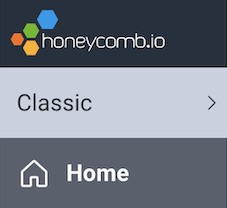
If your Honeycomb team existed before the [Honeycomb Environments and Services change](https://changelog.honeycomb.io/preview-new-environments-and-services-functionality-in-honeycomb!-227356), you have a Classic environment.
To be sure, look for a label below Honeycomb logo in the Honeycomb UI.
Honeycomb Classic environments have a **Classic** label with a gray background.
 ## Migrate from meta.span\_type in span events and attributes
The use of the field `meta.span_type` to identify Span Events and Span Links (hereafter called Span Annotations) was removed as of **2020-09-30**.
Note that this only applies to using the field `meta.span_type` to identify Span Annotations.
This change only applies to you if you are using the field named `meta.span_type` for annotations.
If you are using the field for your own use, you can disregard this.
### What this change means
Datasets that use the field `meta.span_type` to identify Span Annotations will continue to work as they do now.
Teams are encouraged to migrate their systems to use `meta.annotation_type` to identify Span Annotations.
Honeycomb will no longer provide feature enhancements or bug fixes for Span Annotations that use `meta.span_type` as their identifying field.
### How to migrate your instrumentation if you use span annotations
If you do not use Span Annotations, no migration is required.
#### OpenTelemetry Exporter users
Upgrade to the latest version of your OpenTelemetry Exporter.
#### Users of other instrumentation types
For example, Beelines, OpenTracing, and so on.
Update your instrumentation code to replace the field name `meta.span_type` with the field name `meta.annotation_type`.
OR
If you use your own field name to identify Span Annotations, you do not need to change your instrumentation code.
Instead:
1. Go to your Dataset Settings > Definitions tab
2. Set the field `Metadata: Annotation Type` to your field name.
3. Set the field `Metadata: Kind` to blank by clicking the X to remove assignment on this field.
4. Save your changes.
Read more on the [Definitions tab](/configure/datasets/definitions/).
## Migrate from meta.span\_type in span events and attributes
The use of the field `meta.span_type` to identify Span Events and Span Links (hereafter called Span Annotations) was removed as of **2020-09-30**.
Note that this only applies to using the field `meta.span_type` to identify Span Annotations.
This change only applies to you if you are using the field named `meta.span_type` for annotations.
If you are using the field for your own use, you can disregard this.
### What this change means
Datasets that use the field `meta.span_type` to identify Span Annotations will continue to work as they do now.
Teams are encouraged to migrate their systems to use `meta.annotation_type` to identify Span Annotations.
Honeycomb will no longer provide feature enhancements or bug fixes for Span Annotations that use `meta.span_type` as their identifying field.
### How to migrate your instrumentation if you use span annotations
If you do not use Span Annotations, no migration is required.
#### OpenTelemetry Exporter users
Upgrade to the latest version of your OpenTelemetry Exporter.
#### Users of other instrumentation types
For example, Beelines, OpenTracing, and so on.
Update your instrumentation code to replace the field name `meta.span_type` with the field name `meta.annotation_type`.
OR
If you use your own field name to identify Span Annotations, you do not need to change your instrumentation code.
Instead:
1. Go to your Dataset Settings > Definitions tab
2. Set the field `Metadata: Annotation Type` to your field name.
3. Set the field `Metadata: Kind` to blank by clicking the X to remove assignment on this field.
4. Save your changes.
Read more on the [Definitions tab](/configure/datasets/definitions/).