> ## Documentation Index
> Fetch the complete documentation index at: https://docs.honeycomb.io/llms.txt
> Use this file to discover all available pages before exploring further.
# Parse Severity
Ent+
This feature is available as an add-on for the [Honeycomb Enterprise plan](https://www.honeycomb.io/pricing/).
Please contact your Honeycomb account team for details.
| Metrics | Logs | Traces | Telemetry Pipeline Collector |
| :------ | :--- | :----- | :--------------------------- |
| - | ✓ | - | `v1.36.0`+ |
## Description
The Parse Severity Processor is designed to normalize severity fields in log data into user-defined values, enhancing the consistency and readability of log data. By allowing users to map existing severity values to standard levels, it aids in the uniform analysis and visualization of logs across varied sources.
## Use
The processor is essential in environments where logs from different sources use varied severity naming conventions. By mapping these diverse severity indicators to standard values, it ensures that the severity data remains consistent, making it easier to filter, analyze, and generate insights from the log data.
## Configuration
| Field | Description |
| :------------- | :---------------------------------------------------------------------------------------------------------------------------------- |
| Condition | An OTTL condition that must evaluate to true for the processor to be applied to the logs, allowing selective processing of entries. |
| Match | Specifies the location of the severity value in the log entry: body, resource, or attributes. |
| Severity Field | The specific field that contains the severity value to be parsed and normalized. |
| Trace | A list of values that 'TRACE' severity should be mapped to. |
| Debug | A list of values that 'DEBUG' severity should be mapped to. |
| Info | A list of values that 'INFO' severity should be mapped to. |
| Warn | A list of values that 'WARN' severity should be mapped to. |
| Error | A list of values that 'ERROR' severity should be mapped to. |
| Fatal | A list of values that 'FATAL' severity should be mapped to. |
## Example Configurations
### Available Parsing Formats
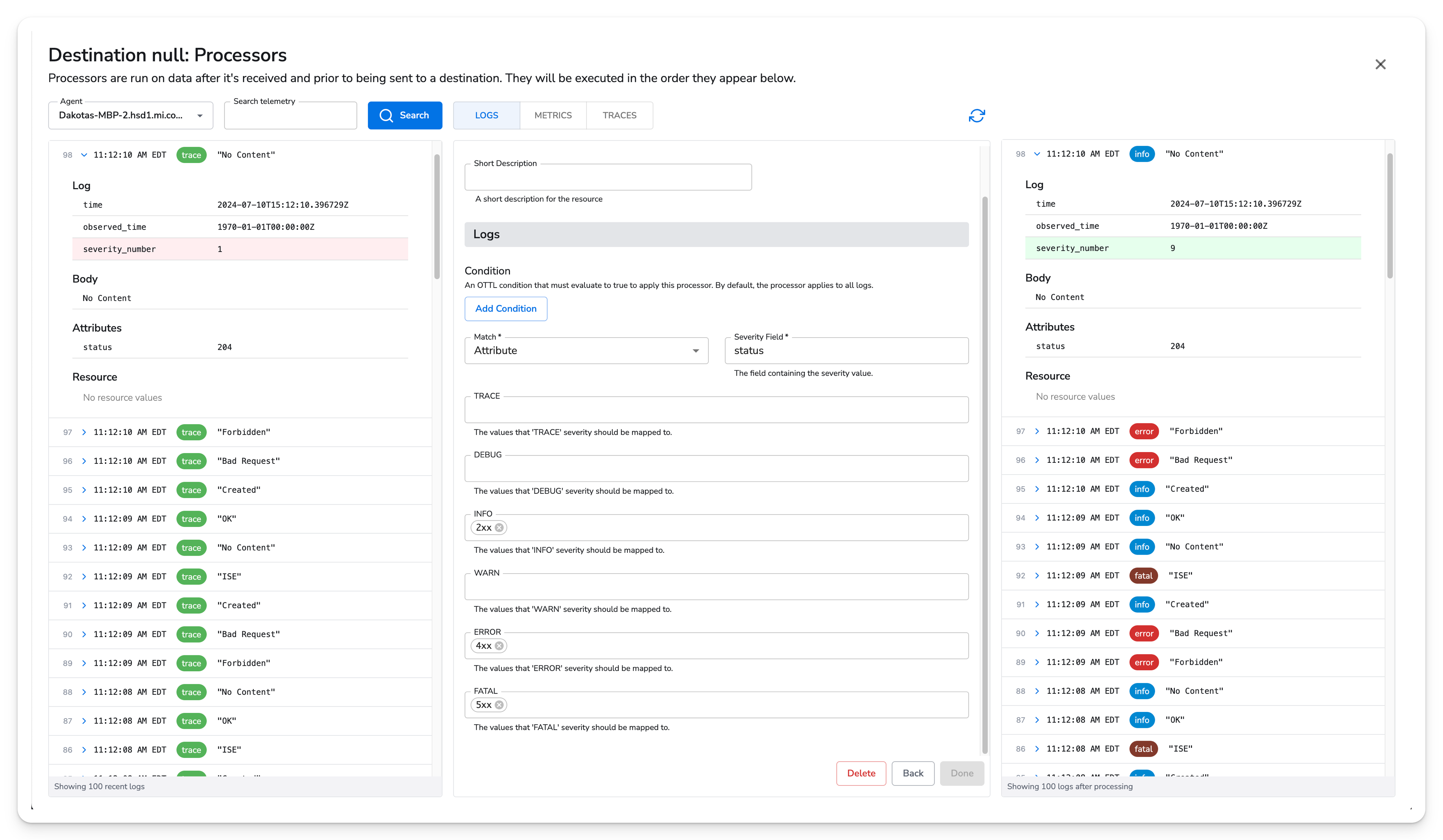
In addition to simple string matching, this processor supports some unique value mapping options. For example, HTTP status code ranges can easily be assigned using notation such as `2xx`, seen below. Available HTTP status code ranges include `1xx`, `2xx`, `3xx`, `4xx`, and `5xx`.
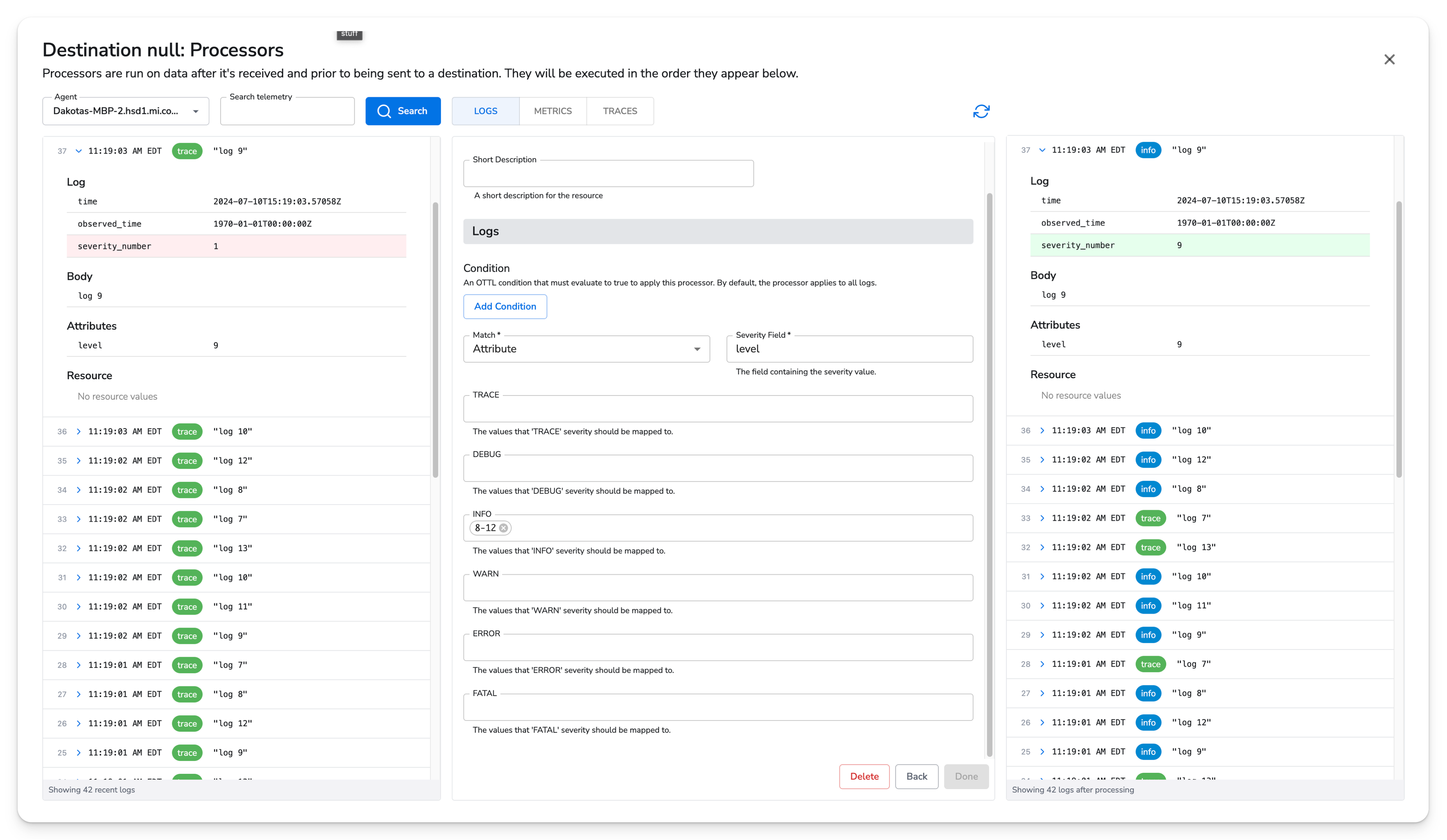
 Another unique value mapping is a range of numbers, such as `8-12`. This will map any number in that range, such as 9, to the log level this range is assigned to.
 ### Normalize Severity Levels in Log Data
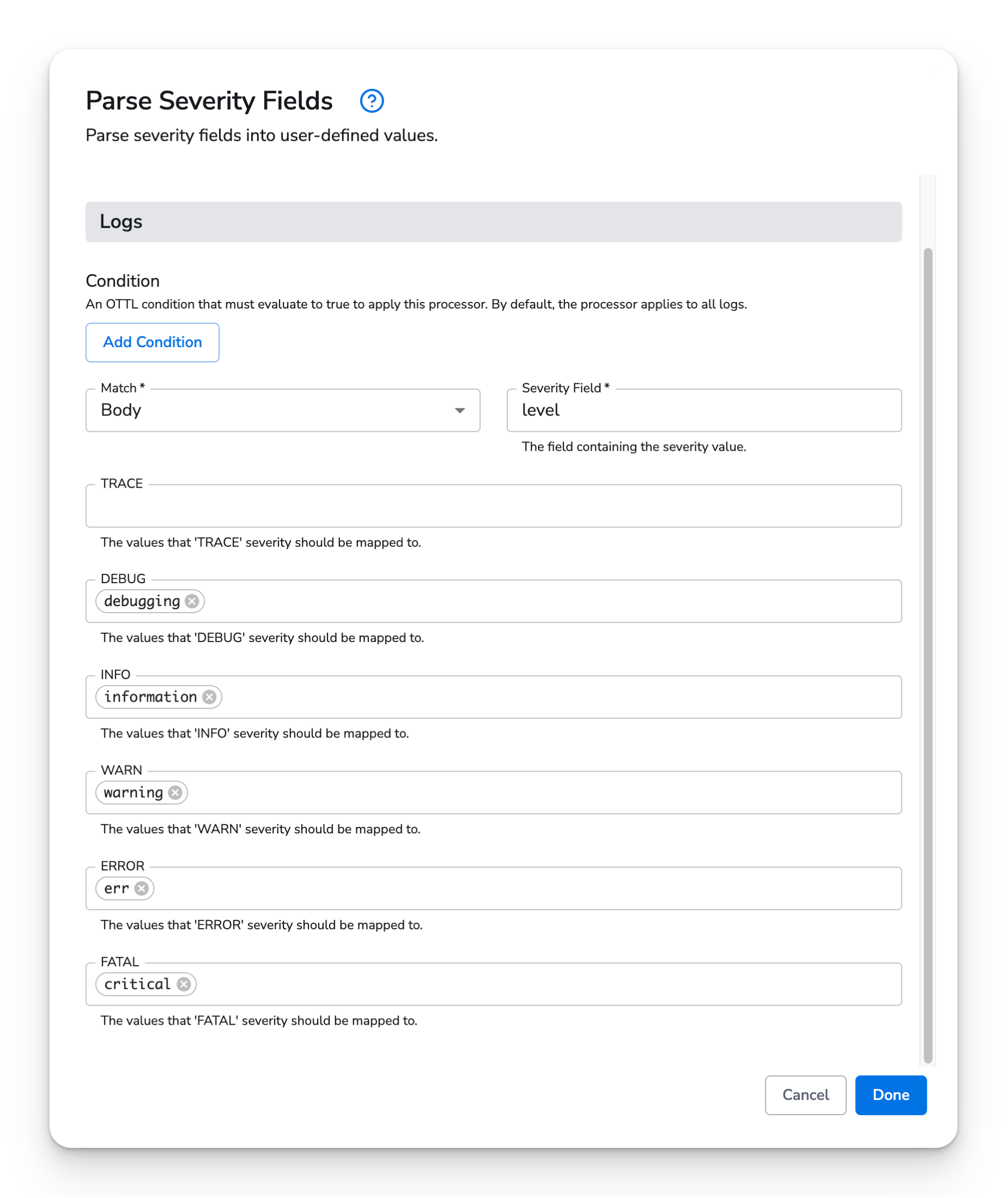
In this example, the Parse Severity Processor is configured to normalize severity levels from the "level" field in the log body into user-defined standard levels.
### Normalize Severity Levels in Log Data
In this example, the Parse Severity Processor is configured to normalize severity levels from the "level" field in the log body into user-defined standard levels.
 Here is a sample log entry:
**Body:**
```JSON theme={}
{
"message": "An error occurred during processing",
"level": "err"
}
```
The objective is to map the "err" severity level to a standard "error" level for consistency across all log entries. The configuration for the Parse Severity Processor is as follows:
* Condition: `"true"` (applies to all logs)
* Log Body, Resource, or Attributes: `Body`
* Severity Field: `level`
* Severity Mappings:
```JSON theme={}
{
"err": "error",
"warning": "warn",
"information": "info",
"debugging": "debug",
"critical": "fatal"
}
```
With this setup, when the log entry is processed, the "severity" field is updated as follows:
**Log After Processing:**
```JSON theme={}
{
"severity": "error"
}
```
The severity level "err" is now normalized to "error," allowing for a uniform representation of severity levels across all log entries. This normalization facilitates more straightforward log analysis, filtering, and alerting, especially when dealing with logs from multiple sources with different severity naming conventions.
Here is a sample log entry:
**Body:**
```JSON theme={}
{
"message": "An error occurred during processing",
"level": "err"
}
```
The objective is to map the "err" severity level to a standard "error" level for consistency across all log entries. The configuration for the Parse Severity Processor is as follows:
* Condition: `"true"` (applies to all logs)
* Log Body, Resource, or Attributes: `Body`
* Severity Field: `level`
* Severity Mappings:
```JSON theme={}
{
"err": "error",
"warning": "warn",
"information": "info",
"debugging": "debug",
"critical": "fatal"
}
```
With this setup, when the log entry is processed, the "severity" field is updated as follows:
**Log After Processing:**
```JSON theme={}
{
"severity": "error"
}
```
The severity level "err" is now normalized to "error," allowing for a uniform representation of severity levels across all log entries. This normalization facilitates more straightforward log analysis, filtering, and alerting, especially when dealing with logs from multiple sources with different severity naming conventions.