> ## Documentation Index
> Fetch the complete documentation index at: https://docs.honeycomb.io/llms.txt
> Use this file to discover all available pages before exploring further.
# Mask Sensitive Data
Ent+
This feature is available as an add-on for the [Honeycomb Enterprise plan](https://www.honeycomb.io/pricing/).
Please contact your Honeycomb account team for details.
## Description
The Mask Sensitive Data processor can be used to detect and mask sensitive data.
## Supported Types
| Metrics | Logs | Traces |
| :------ | :--- | :----- |
| ✓ | ✓ | ✓ |
## Configuration Table
| Parameter | Type | Default | Description |
| :----------------------- | :-------- | :----------------------------------------- | :-------------------------------------------------------------------------------------------------------------- |
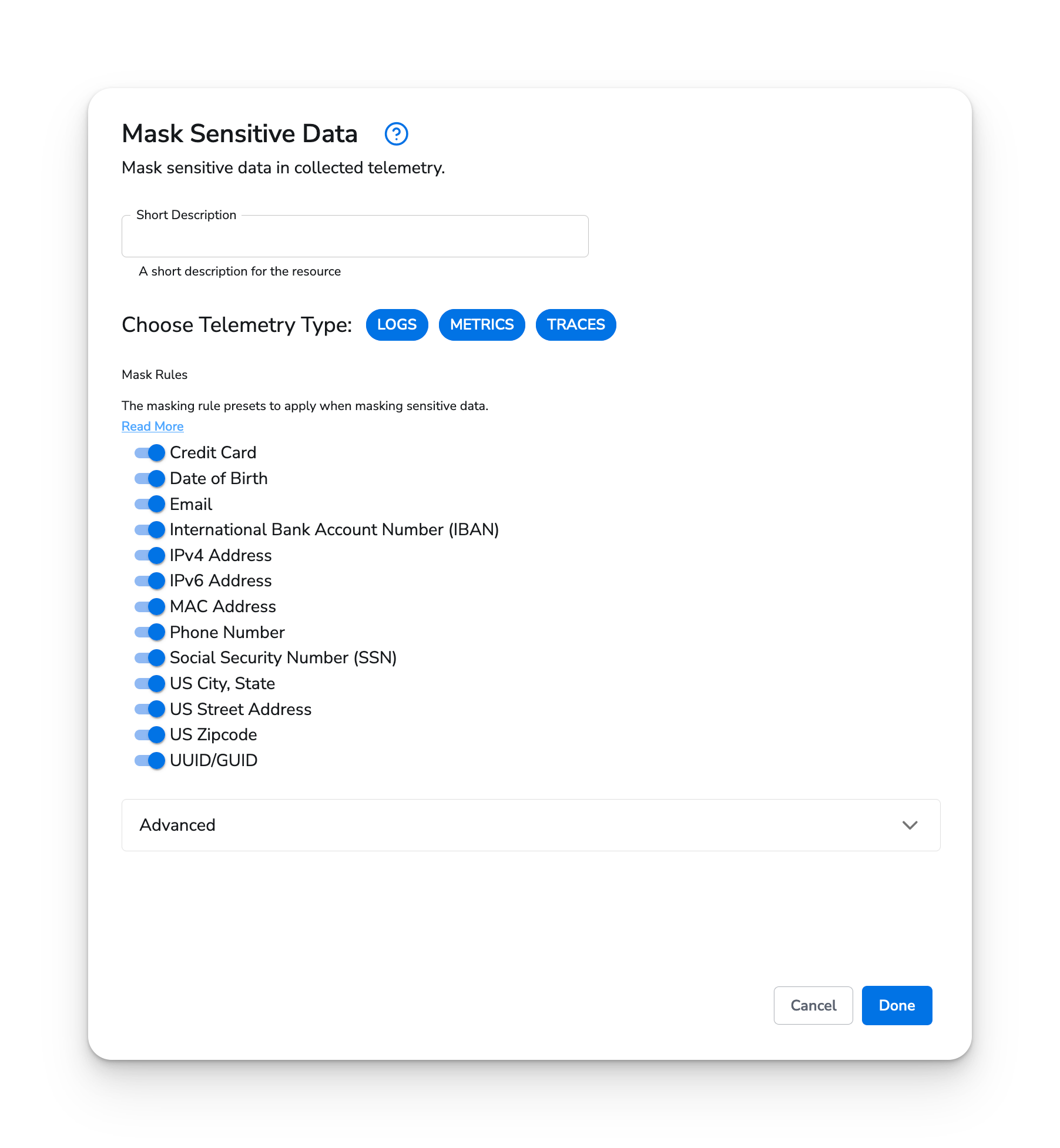
| telemetry\_types | `strings` | `[Metrics, Logs, Traces]` | Which types of telemetry to apply masking rules to. |
| default\_rules | `enums` | See [default rules](#default-rules-values) | Commonly used masking rules. |
| custom\_rules | `map` | See [custom rules](#custom-rules-values) | Create custom rules with the key being the rule name and the value being a regular expression to match against. |
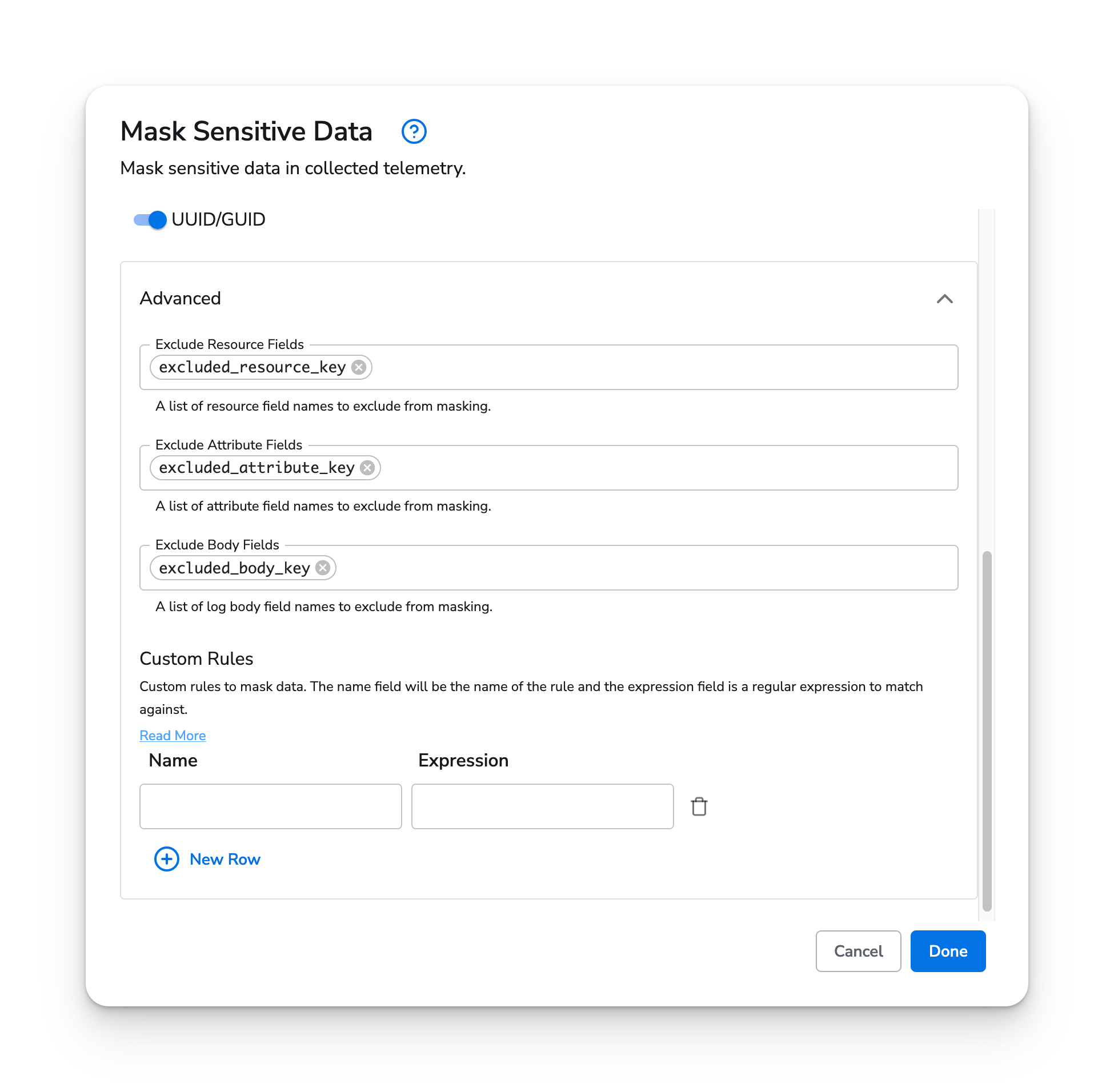
| exclude\_resource\_keys | `strings` | | A list of resource keys to exclude from masking. |
| exclude\_attribute\_keys | `strings` | | A list of attribute keys to exclude from masking. |
| exclude\_body\_keys | `strings` | | A list of log body keys to exclude from masking. |
\* *required field*
### Default Rules Values
* Credit Card: `\b(?:(?:(?:\d{4}[- ]?){3}\d{4}|\d{15,16}))\b`
* Date of Birth: `\b(0?[1-9]|1[0-2])\/(0?[1-9]|[12]\d|3[01])\/(?:\d{2})?\d{2}\b`
* Email: `\b[a-zA-Z0-9._\/\+\-—|]+@[A-Za-z0-9.\-—|]+\.?[a-zA-Z|]{0,6}\b`
* International Bank Account Number (IBAN): `\b[A-Z]{2}\d{2}[A-Z\d]{1,30}\b`
* IPv4 Address: `\b(?:[0-9]{1,3}\.){3}[0-9]{1,3}\b`
* IPv6 Address: `\b(?:[0-9a-fA-F]{1,4}:){7}[0-9a-fA-F]{1,4}\b`
* MAC Address: `\b([0-9A-Fa-f]{2}[:-]){5}[0-9A-Fa-f]{2}\b`
* Phone Number: `\b((\+|\b)[1l][\-\. ])?\(?\b[\dOlZSB]{3,5}([\-\. ]|\) ?)[\dOlZSB]{3}[\-\. ][\dOlZSB]{4}\b`
* Social Security Number (SSN): `\b\d{3}[- ]\d{2}[- ]\d{4}\b`
* US City, State: `\b[A-Z][A-Za-z\s\.]+,\s{0,1}[A-Z]{2}\b`
* US Street Address: `\b\d+\s[A-z]+\s[A-z]+(\s[A-z]+)?\s*\d*\b`
* US Zipcode: `\b\d{5}(?:[-\s]\d{4})?\b`
* UUID/GUID: `\b[a-fA-F0-9]{8}-[a-fA-F0-9]{4}-4[a-fA-F0-9]{3}-[8|9|aA|bB][a-fA-F0-9]{3}-[a-fA-F0-9]{12}\b`
## Example Configuration
### Basic Configuration
Below is an example of configuration using the defaults.
#### Web Interface
 #### Standalone Processor
```yaml theme={}
apiVersion: bindplane.observiq.com/v1
kind: Processor
metadata:
id: mask_sensitive_data
name: mask_sensitive_data
spec:
type: mask_sensitive_data
parameters:
- name: telemetry_types
value: ['Metrics', 'Logs', 'Traces']
```
### Custom Rules Values
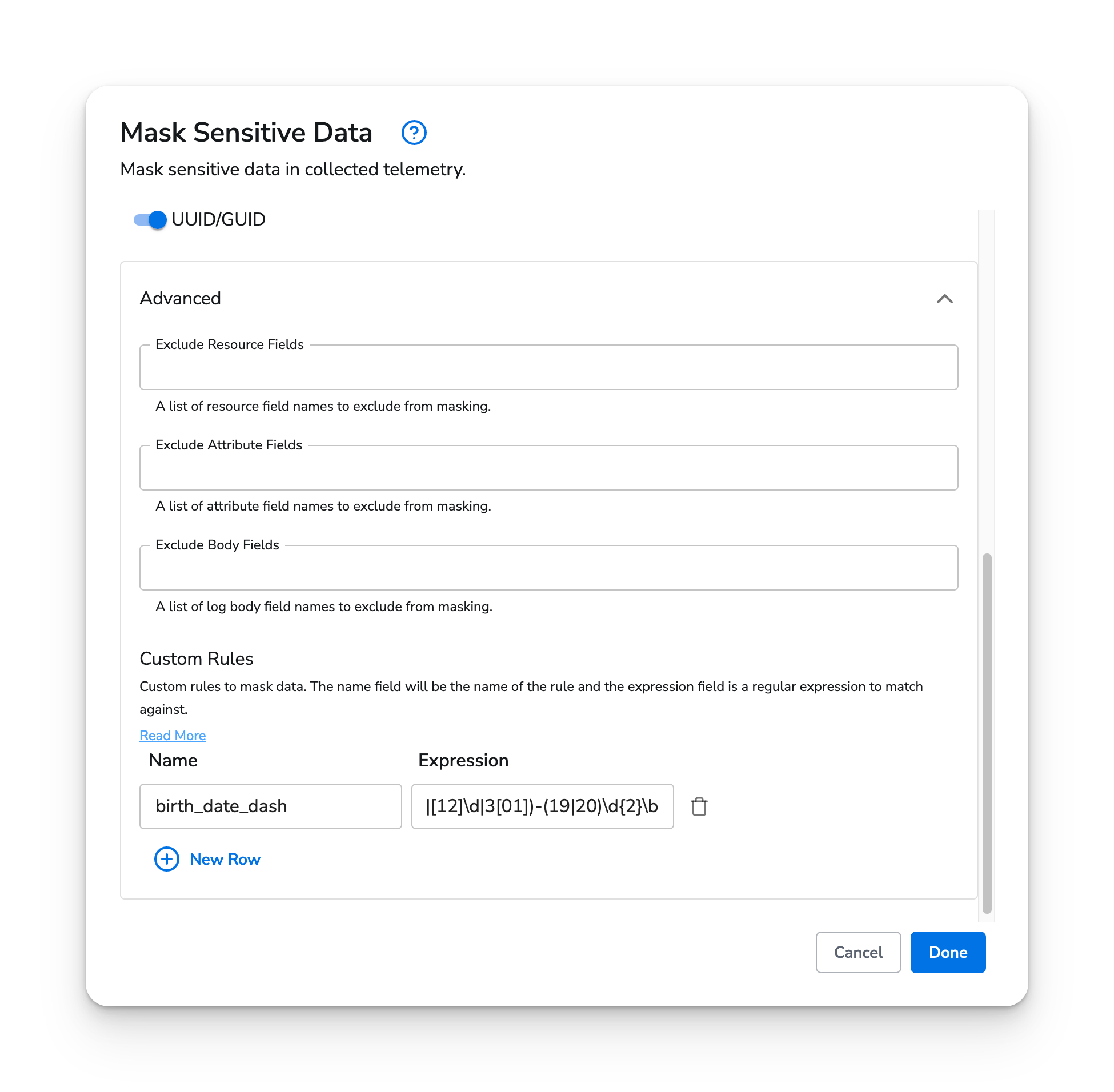
Here you can add custom rules for masking. The `Key` is the name of the rule and the `Value` is the regular expression to match against.
#### Example
The default rule for Date of Birth masking would not match against a date that is separated by dashes, e.g `01-01-1990`, but we can include a stricter regular expression in the Custom Rules parameter. Here we created a rule called `birth_date_dash` with value `\b(0[1-9]|1[0-2])-(0[1-9]|[12]\d|3[01])-(19|20)\d{2}\b`. This will match against dates separated by dashes.
##### Web Interface
#### Standalone Processor
```yaml theme={}
apiVersion: bindplane.observiq.com/v1
kind: Processor
metadata:
id: mask_sensitive_data
name: mask_sensitive_data
spec:
type: mask_sensitive_data
parameters:
- name: telemetry_types
value: ['Metrics', 'Logs', 'Traces']
```
### Custom Rules Values
Here you can add custom rules for masking. The `Key` is the name of the rule and the `Value` is the regular expression to match against.
#### Example
The default rule for Date of Birth masking would not match against a date that is separated by dashes, e.g `01-01-1990`, but we can include a stricter regular expression in the Custom Rules parameter. Here we created a rule called `birth_date_dash` with value `\b(0[1-9]|1[0-2])-(0[1-9]|[12]\d|3[01])-(19|20)\d{2}\b`. This will match against dates separated by dashes.
##### Web Interface
 ##### Standalone Processor
```yaml theme={}
apiVersion: bindplane.observiq.com/v1
kind: Processor
metadata:
id: mask_sensitive_data
name: mask_sensitive_data
spec:
type: mask_sensitive_data
parameters:
- name: telemetry_types
value: ["Metrics", "Logs", "Traces"]
- name: custom_rules
value:
birth_date_dash: \b(0[1-9]|1[0-2])-(0[1-9]|[12]\d|3[01])-(19|20)\d{2}\b
```
### Exclusions
You can exclude fields from being masked based on their key by specifying excluded keys in the body, resources, or attributes respectively.
#### Web Interface
##### Standalone Processor
```yaml theme={}
apiVersion: bindplane.observiq.com/v1
kind: Processor
metadata:
id: mask_sensitive_data
name: mask_sensitive_data
spec:
type: mask_sensitive_data
parameters:
- name: telemetry_types
value: ["Metrics", "Logs", "Traces"]
- name: custom_rules
value:
birth_date_dash: \b(0[1-9]|1[0-2])-(0[1-9]|[12]\d|3[01])-(19|20)\d{2}\b
```
### Exclusions
You can exclude fields from being masked based on their key by specifying excluded keys in the body, resources, or attributes respectively.
#### Web Interface
 #### Standalone Processor
```yaml theme={}
apiVersion: bindplane.observiq.com/v1
kind: Processor
metadata:
id: mask_sensitive_data
name: mask_sensitive_data
spec:
type: mask_sensitive_data
parameters:
- name: telemetry_types
value: ['Metrics', 'Logs', 'Traces']
- name: exclude_resource_keys
value: ['excluded_resource_key']
- name: exclude_attribute_keys
value: ['excluded_attribute_key']
- name: exclude_body_keys
value: ['excluded_body_key']
```
#### Standalone Processor
```yaml theme={}
apiVersion: bindplane.observiq.com/v1
kind: Processor
metadata:
id: mask_sensitive_data
name: mask_sensitive_data
spec:
type: mask_sensitive_data
parameters:
- name: telemetry_types
value: ['Metrics', 'Logs', 'Traces']
- name: exclude_resource_keys
value: ['excluded_resource_key']
- name: exclude_attribute_keys
value: ['excluded_attribute_key']
- name: exclude_body_keys
value: ['excluded_body_key']
```