> ## Documentation Index
> Fetch the complete documentation index at: https://docs.honeycomb.io/llms.txt
> Use this file to discover all available pages before exploring further.
# Filter by Condition
Ent+
This feature is available as an add-on for the [Honeycomb Enterprise plan](https://www.honeycomb.io/pricing/).
Please contact your Honeycomb account team for details.
## Filter by Condition Processor
The Filter by Condition processor can be used to include or exclude telemetry based on a condition that is evaluated against the telemetry data.
## Supported Types
| Metrics | Logs | Traces |
| :------ | :--- | :----- |
| ✓ | ✓ | ✓ |
## Configuration
| Field | Description |
| :-------------------- | :---------------------------------------------------------------------------------------------------------------------------- |
| Choose Telemetry Type | The types of telemetry to filter. |
| Action | The action to take when the condition is met. Include will retain matching telemetry. Exclude will remove matching telemetry. |
| Condition | The condition to match against telemetry to include or exclude based on the action. |
## Example Configuration
### Excluding matching log records
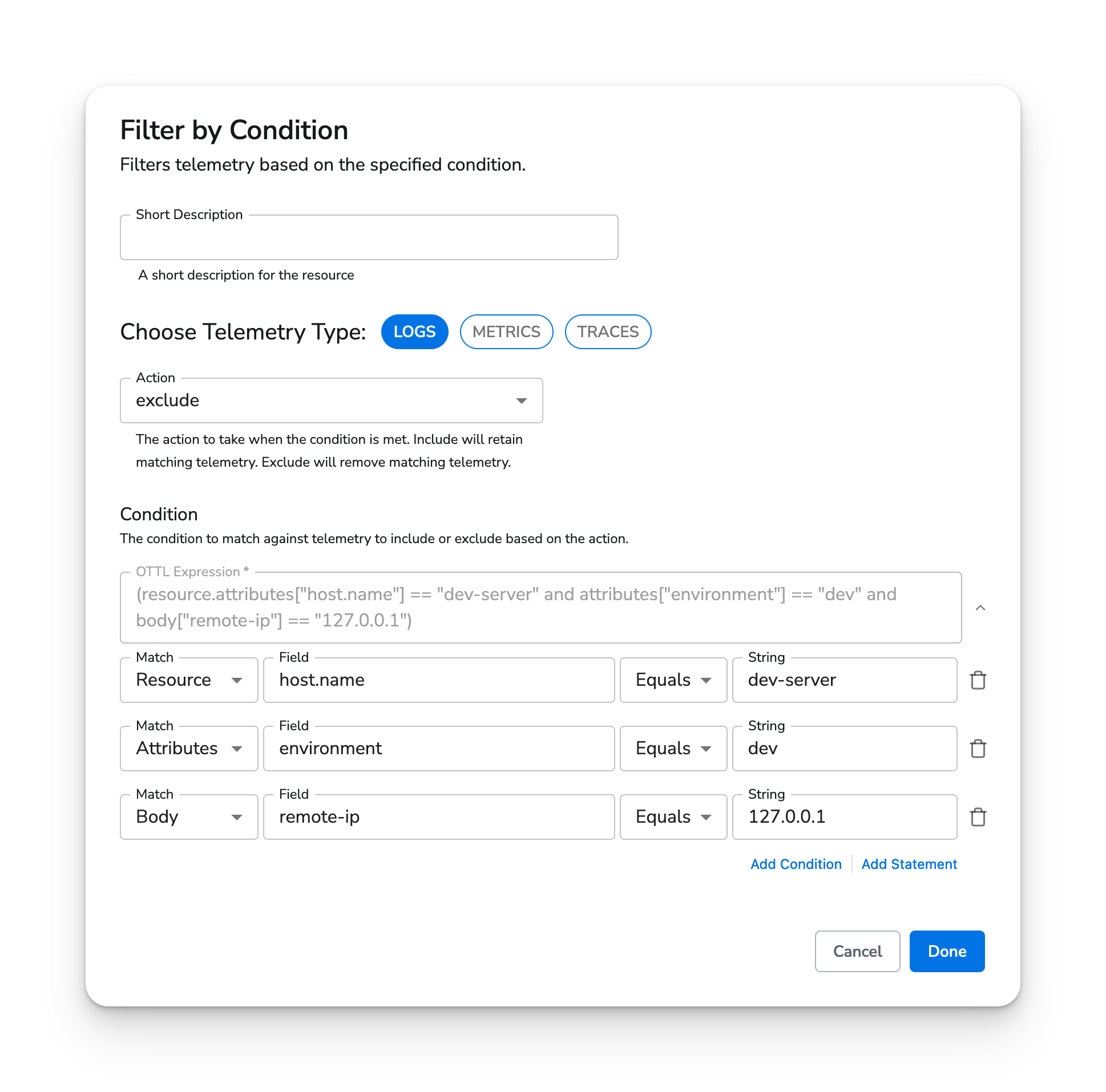
In this example, we exclude logs that have **all** of the following:
* A `host.name` resource attribute that equals `dev-server`
* An `environment` attribute that equals `dev`
* A `remote-ip` log body field that equals `127.0.0.1`
### Web Interface
 ## API Reference
This processor can be defined as yaml and applied using the CLI or API.
### Type
filter-by-condition
### Parameters
| Parameter | Type | Default | Description |
| :--------------- | :------------------ | :------------------------------ | :---------------------------------------------------------------------------------------------------------------------------- |
| telemetry\_types | `telemetrySelector` | `["Logs", "Metrics", "Traces"]` | The types of telemetry to filter. |
| action | `enum` | `exclude` | The action to take when the condition is met. Include will retain matching telemetry. Exclude will remove matching telemetry. |
| condition | `condition` | `{"ottl":""}` | The condition to match against telemetry to include or exclude based on the action. |
### Standalone Processor
```yaml theme={}
apiVersion: bindplane.observiq.com/v1
kind: Processor
metadata:
name: filter-by-condition-example
spec:
type: filter-by-condition
parameters:
- name: telemetry_types
value:
- Logs
- name: action
value: exclude
- name: condition
value:
ottl: (resource.attributes["host.name"] == "dev-server" and attributes["environment"] == "dev" and body["remote-ip"] == "127.0.0.1")
ui:
statements:
- key: host.name
match: resource
operator: Equals
value: dev-server
- key: environment
match: attributes
operator: Equals
value: dev
- key: remote-ip
match: body
operator: Equals
value: 127.0.0.1
```
## API Reference
This processor can be defined as yaml and applied using the CLI or API.
### Type
filter-by-condition
### Parameters
| Parameter | Type | Default | Description |
| :--------------- | :------------------ | :------------------------------ | :---------------------------------------------------------------------------------------------------------------------------- |
| telemetry\_types | `telemetrySelector` | `["Logs", "Metrics", "Traces"]` | The types of telemetry to filter. |
| action | `enum` | `exclude` | The action to take when the condition is met. Include will retain matching telemetry. Exclude will remove matching telemetry. |
| condition | `condition` | `{"ottl":""}` | The condition to match against telemetry to include or exclude based on the action. |
### Standalone Processor
```yaml theme={}
apiVersion: bindplane.observiq.com/v1
kind: Processor
metadata:
name: filter-by-condition-example
spec:
type: filter-by-condition
parameters:
- name: telemetry_types
value:
- Logs
- name: action
value: exclude
- name: condition
value:
ottl: (resource.attributes["host.name"] == "dev-server" and attributes["environment"] == "dev" and body["remote-ip"] == "127.0.0.1")
ui:
statements:
- key: host.name
match: resource
operator: Equals
value: dev-server
- key: environment
match: attributes
operator: Equals
value: dev
- key: remote-ip
match: body
operator: Equals
value: 127.0.0.1
```