> ## Documentation Index
> Fetch the complete documentation index at: https://docs.honeycomb.io/llms.txt
> Use this file to discover all available pages before exploring further.
# Generate Traces from Build Pipelines
> Generate distributed traces from your CI/CD build pipelines using Honeycomb's Buildevents tool and analyze build performance in Honeycomb.
Use Honeycomb to instrument your CI/CD build pipelines and generate distributed traces that give you visibility into build performance, test duration, and pipeline failures.
Honeycomb's [`buildevents`](https://github.com/honeycombio/buildevents) generates distributed traces from work in a build pipeline.
It is installed during the setup phase and invoked as part of each step to visualize the build as a trace in Honeycomb.
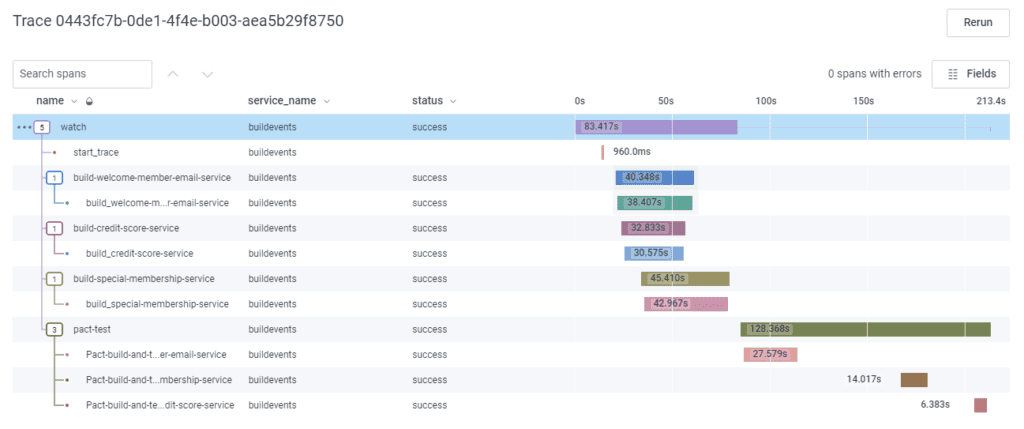
The resulting trace represents the entire build.
It includes spans for each section and subsection of the build, representing groups of actual commands that are run.
The duration of each span is how long that stage or specific command took to run and includes whether or not the command succeeded.
The following is an example trace that shows a build that ran on CircleCI.
It goes through starting the trace to building services to running tests.
Each span has a custom and standard context representing each part of the build pipeline.
 To use your pipeline telemetry to gate deployments, use Buildevents traces as the data source for
[GitHub Deployment Protection Rules](/integrations/github-deployment-protection-rules/).
## Before You Begin
Determine if your build environment is supported by `buildevents`:
* Travis CI
* CircleCI
* GitLab CI
* Buildkite
* Jenkins X
* Google Cloud Build
* GitHub Actions
* Bitbucket Pipelines
## Installation
Using `buildevents` requires the following:
* Installation of the [`buildevents` binary](https://github.com/honeycombio/buildevents) within the build environment.
* Configuration of the `BUILDEVENT_APIKEY` and `BUILDEVENT_DATASET` environment variables.
For more information, refer to the [complete environment variables list](https://github.com/honeycombio/buildevents#environment-variables).
Use the step-by-step guides below for **CircleCI**, **GitHub Actions**, or **GitLab**.
Each guide provides a hands-on walkthrough on how to use and configure the `buildevents` for a specific CI/CD build environment against a sample app with a predefined build pipeline.
Each guide shows how to:
* Use `buildevents` for the respective build
* Iteratively construct a trace by adding more incremental visibility to each step
* Use the Honeycomb UI to visualize and debug your build pipeline
* Avoid common pitfalls when working with the CI tool and Honeycomb's `buildevents`
If using a provider **not** listed in a guide above, you can still use the `buildevents` binary by following the steps described in the [`buildevents` repository](https://github.com/honeycombio/buildevents).
## Generate Queries and Boards for CI/CD
Honeycomb provides a Terraform module, which automatically generates a set of [queries](/investigate/query/build/) and [boards](/observe/boards/) within Honeycomb for CI/CD integrations.
Use this "Honeycomb Buildevents Starter Pack" as a starting point when exploring your pipeline data.
To install, refer to the [Terraform module README](https://registry.terraform.io/modules/honeycombio/buildevents-starter-pack/honeycombio/latest).
Installation requires a minimal configuration added to a `.tf` file and setting an API key environment variable.
To use your pipeline telemetry to gate deployments, use Buildevents traces as the data source for
[GitHub Deployment Protection Rules](/integrations/github-deployment-protection-rules/).
## Before You Begin
Determine if your build environment is supported by `buildevents`:
* Travis CI
* CircleCI
* GitLab CI
* Buildkite
* Jenkins X
* Google Cloud Build
* GitHub Actions
* Bitbucket Pipelines
## Installation
Using `buildevents` requires the following:
* Installation of the [`buildevents` binary](https://github.com/honeycombio/buildevents) within the build environment.
* Configuration of the `BUILDEVENT_APIKEY` and `BUILDEVENT_DATASET` environment variables.
For more information, refer to the [complete environment variables list](https://github.com/honeycombio/buildevents#environment-variables).
Use the step-by-step guides below for **CircleCI**, **GitHub Actions**, or **GitLab**.
Each guide provides a hands-on walkthrough on how to use and configure the `buildevents` for a specific CI/CD build environment against a sample app with a predefined build pipeline.
Each guide shows how to:
* Use `buildevents` for the respective build
* Iteratively construct a trace by adding more incremental visibility to each step
* Use the Honeycomb UI to visualize and debug your build pipeline
* Avoid common pitfalls when working with the CI tool and Honeycomb's `buildevents`
If using a provider **not** listed in a guide above, you can still use the `buildevents` binary by following the steps described in the [`buildevents` repository](https://github.com/honeycombio/buildevents).
## Generate Queries and Boards for CI/CD
Honeycomb provides a Terraform module, which automatically generates a set of [queries](/investigate/query/build/) and [boards](/observe/boards/) within Honeycomb for CI/CD integrations.
Use this "Honeycomb Buildevents Starter Pack" as a starting point when exploring your pipeline data.
To install, refer to the [Terraform module README](https://registry.terraform.io/modules/honeycombio/buildevents-starter-pack/honeycombio/latest).
Installation requires a minimal configuration added to a `.tf` file and setting an API key environment variable.